
A FastAPI backend app cataloging leaders from Halo Wars 2, built with Python, Pydantic, and SQLAlchemy.
Abouth2
As a seasoned frontend developer, I decided to venture into the world of backend development to broaden my skills a bit. Some technologies I wanted to learn specifically were Python, FastAPI, Pydantic, and SQLAlchemy. I personally am not a huge fan of tutorials so I decided to have ChatGPT walk me through how to make a backend app so I could learn by doing and have something to show in the end.
I’ve been playing Halo Wars 2 a lot lately so, I decided to create a backend that can catalog the main characters you can play as from the game. Also to make it a bit more fun I had ChatGPT address me as “Master Chief” throughout the process.
Getting Startedh2
My first task was to set up the project structure. With the help of my AI assistant, I created a virtual environment and installed the necessary dependencies:
python -m venv venvsource venv/bin/activatepip install fastapi uvicorn sqlalchemy psycopg2-binary pydanticNext, I set up the FastAPI application and created models for the leaders and their powers using SQLAlchemy. Here’s a snippet of the models.py file:
from sqlalchemy import Column, Integer, String, ForeignKeyfrom sqlalchemy.orm import relationshipfrom .database import Base
class Leader(Base):    __tablename__ = "leaders"    id = Column(Integer, primary_key=True, index=True)    name = Column(String, index=True)    faction = Column(String)    background = Column(String)    leader_powers = relationship("LeaderPower", back_populates="leader")
class LeaderPower(Base):    __tablename__ = "leader_powers"    id = Column(Integer, primary_key=True, index=True)    name = Column(String, index=True)    description = Column(String)    power_tier = Column(Integer)    cooldown_time = Column(Integer)    leader_id = Column(Integer, ForeignKey('leaders.id'))    leader = relationship("Leader", back_populates="leader_powers")
Building the APIh2
With the models in place, I moved on to creating the CRUD operations and setting up the endpoints. This part was crucial in understanding how to interact with the database and serve data through FastAPI. Here’s an example of the endpoint to create a new leader:
@app.post("/leaders/", response_model=schemas.Leader)def create_leader(leader: schemas.LeaderCreate, db: Session = Depends(get_db)): return crud.create_leader(db=db, leader=leader)Testing the Applicationh3
Testing is always an integral part of the development process. I used pytest to ensure that the API behaved as expected. Setting up the tests required ensuring the database was correctly reset between tests, which was a valuable learning experience. Here’s a snippet of one of the test functions:
def test_create_leader(client):    response = client.post(        "/leaders/",        json={"name": "Captain James Cutter", "faction": "UNSC", "background": "Experienced leader"}    )    assert response.status_code == 200    assert response.json()["name"] == "Captain James Cutter"    assert response.json()["faction"] == "UNSC"
def test_read_leader(client):    response = client.post(        "/leaders/",        json={"name": "Captain James Cutter", "faction": "UNSC", "background": "Experienced leader"}    )    assert response.status_code == 200
response = client.get("/leaders/1") assert response.status_code == 200 assert response.json()["name"] == "Captain James Cutter"Screenshotsh2
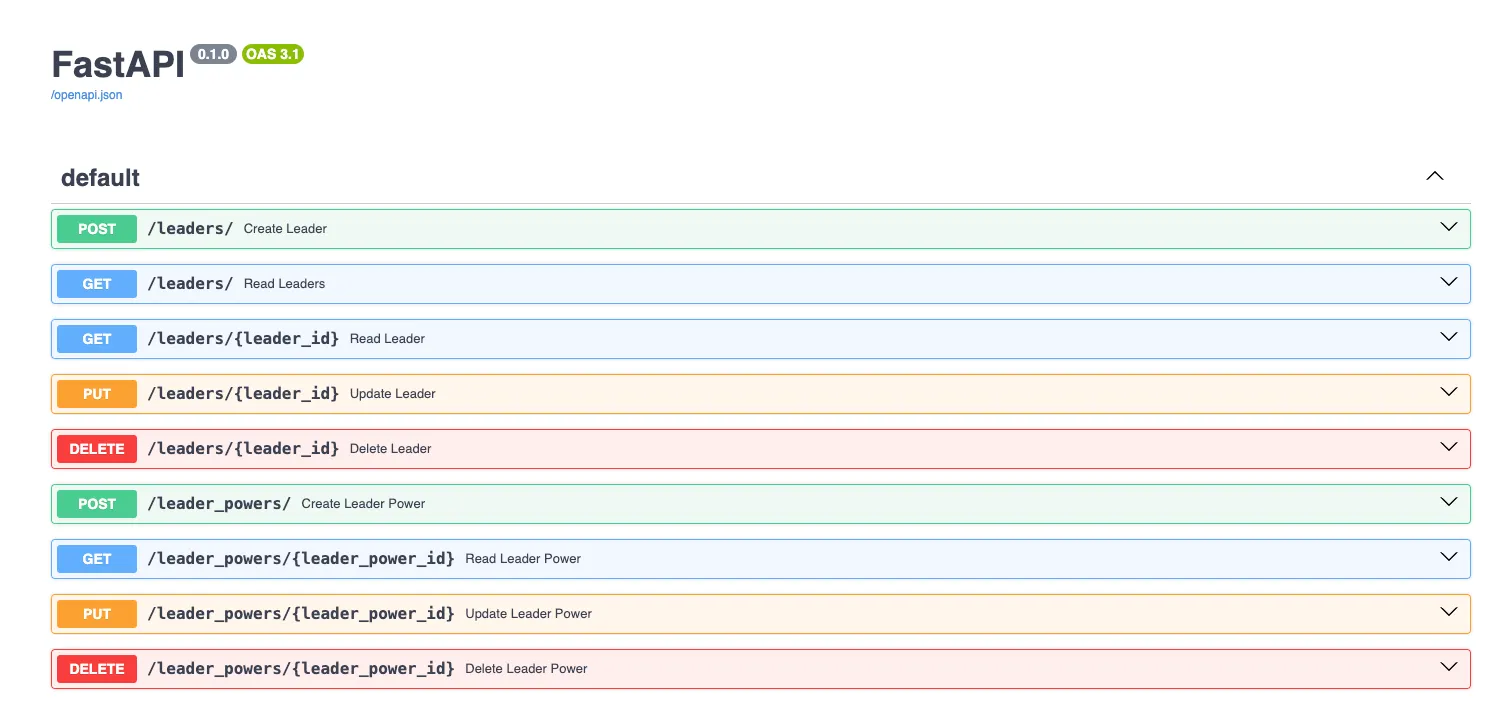
Swagger Documentationh3
One of the fantastic features of FastAPI is the automatic generation of interactive API documentation. Here’s a screenshot of the Swagger UI:
Example JSON Outputh3
Here’s an example of the JSON output when retrieving all leaders:
[ { "id": 1, "name": "Captain James Cutter", "faction": "UNSC", "background": "Experienced leader", "leader_powers": [] }, { "id": 2, "name": "Professor Ellen Anders", "faction": "UNSC", "background": "Brilliant scientist", "leader_powers": [] }, { "id": 3, "name": "Atriox", "faction": "Banished", "background": "Ruthless leader", "leader_powers": [] }]Conclusionh2
This project was a rewarding experience, allowing me to dive into backend development and learn by doing at the same time.